
Published: January 28, 2026 | Reading time: ~13
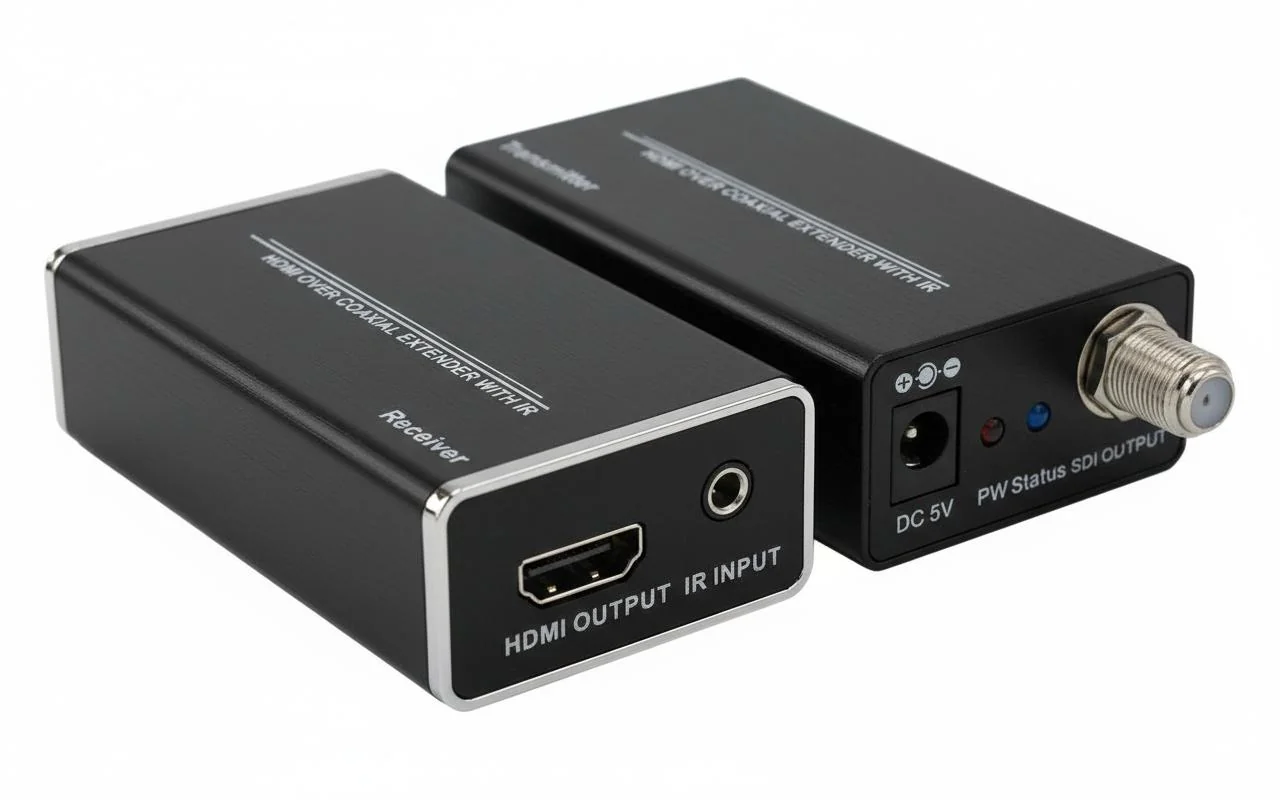
Most people assume video distribution problems start with bad cables or aging TVs. In reality, the issue is usually a format mismatch. HDMI speaks point‑to‑point digital. Coaxial TV systems speak broadcast RF. When those two worlds collide, the screen doesn’t politely explain why—it just says “No Signal.”
This gap shows up everywhere: hotels upgrading set‑top boxes, factories adding digital signage, even homes trying to feed a modern media player into an old television. The wiring is still solid RG‑6, the splitters are fine, and the TVs tune channels just like they always have. What’s missing is a translator who understands both sides.
That’s where an HDMI coax modulator comes in. It takes a clean HDMI source and turns it into an RF channel that your existing coax network can carry hundreds of meters without drama. Done right, it’s boring and reliable. Done wrong, it introduces latency, channel conflicts, and picture artifacts that drive installers crazy. The sections below break down how these modulators really work, what specs matter in practice, and how to choose one without paying for features you’ll never use.
1. The Problem Nobody Mentions Until the TV Says “No Signal.”
A small hotel called about a wing of rooms losing video overnight. Same TVs, same coax wiring, nothing touched—at least that’s what maintenance said. Turned out someone swapped a cable box model. HDMI out only. No RF. The coax plant was fine; the signal source wasn’t speaking the same language anymore.
This is where an HDMI coax modulator HDMI setup earns its keep. You’ve got a modern HDMI source—streaming box, media player, signage controller—and a building wired for coax. Ripping out walls isn’t an option. Wi‑Fi distribution sounds nice until 30 TVs start buffering. The modulator sits in between and does the translation that the infrastructure can’t.
I’ve debugged enough of these installs to say this plainly: most “video distribution problems” are format problems. HDMI is point-to-point. Coax RF is broadcast. An HDMI modulator converts that clean digital HDMI feed into an RF channel your TVs already know how to tune. Simple idea. Plenty of ways to get it wrong.
2. HDMI vs. Coax Distribution: What the Numbers Actually Say
Here’s the comparison people avoid because it ruins shiny proposals. HDMI cables work great up to maybe 10–15 meters reliably without active repeaters. Past that, costs creep up and stability drops. Coax? Hundreds of meters without drama, assuming decent RG‑6 and connectors that weren’t crimped with pliers.
Signal loss on HDMI is unforgiving. A marginal connector shows up as sparkles or dropouts. RF over coax degrades more gracefully. You might lose a dB or two across splitters, but the picture usually stays locked.
Latency is another point. A typical HDMI to ATSC modulator introduces around 80–150 ms, sometimes a bit more, depending on encoding settings. For live sports in a bar, that’s noticeable but manageable. For interactive gaming? Wrong tool.
| Parameter | HDMI Cable Distribution | HDMI RF Modulator Coax Converter |
|---|---|---|
| Distance (typical) | 10–15 m passive | 60–120 m+ over RG‑6 |
| Scalability | 1 display per output | Dozens via splitters |
| Latency | Negligible | ~80–150 ms |
| Infrastructure Cost | High beyond 2–3 displays | Lower if coax exists |
Forget marketing claims. If the building already has coax, RF wins on practicality nine times out of ten.
3. Why Convert HDMI to RF at All?
Why not just run HDMI everywhere? Because buildings aren’t blank schematics. They’re finished, occupied, and full of surprises behind the drywall.
An HDMI modulator takes one HDMI source and turns it into a TV channel—often ATSC in North America—that every television can tune. That’s the core value. Not picture “enhancement.” Not magic. Distribution.
- Hotels pushing one channel to every room
- Campuses with legacy coax plants
- Apartment buildings avoiding new cabling
- Retail signage where sync matters
If you only need one TV, don’t buy a modulator. I’m biased toward using the simplest tool that works.
4. The Most Common Mistake: Buying the Wrong Standard
Seen this too many times: someone buys a DVB‑T modulator for a U.S. install or an ATSC unit for Europe. The box powers up. The RF meter looks fine. The TVs show nothing.
RF standards aren’t interchangeable. ATSC, DVB‑T, ISDB—they’re different modulation schemes. Your TVs’ tuners decide what works, not the modulator.
An HDMI to ATSC modulator is the right call for most North American coax systems. Cable-ready TVs can scan it like an over‑the‑air channel, usually landing somewhere between channel 2 and 99, depending on configuration.
Another trap: channel planning. Drop your modulated channel right on top of an existing OTA frequency, and you’ll get intermittent complaints that make no sense until you check the spectrum.
5. What an HDMI Coax Modulator Actually Does Inside
No magic, just a lot of processing. HDMI comes in as uncompressed digital video and audio. The modulator encodes it—typically H.264—packages it into an MPEG transport stream, then modulates it onto an RF carrier.
Encoding settings matter more than people think. Push the bitrate too low, and fast motion turns to mush. Push it too high and cheaper TVs start dropping packets. Most installs land somewhere in the 12–18 Mbps range for 1080p, but that can vary.
Heat is another reality. These boxes run warm. I’ve measured chassis temps around 42–48°C after a few hours in a rack with poor airflow. Not catastrophic, but not something you bury under paperwork either.
6. Key Features That Matter (and the Ones That Don’t)
Ignore buzzwords. Focus on controls you’ll actually use at 10 p.m. when something breaks.
- User-selectable RF channel with fine frequency adjustment
- Adjustable RF output level to match existing coax loss
- Front-panel status display or at least clear LEDs
- Stable audio handling for PCM and common Dolby formats
Fancy web interfaces are nice until the network VLAN changes. A simple front panel often saves time.
I’ve handled units from various suppliers, including WellCircuits, and consistency in firmware matters more than flashy specs. A stable 1080p channel beats a flaky “4K-capable” claim every time.
7. Specs in the Real World: Reading Between the Lines
Spec sheets love round numbers. Reality doesn’t.
| Specification | Typical Real-World Range | Why It Matters |
|---|---|---|
| Input Resolution | 720p to 1080p60 (some 1080p50) | Mismatch causes scaling artifacts |
| RF Output Level | ~60–80 dBµV adjustable | Too hot overloads tuners |
| Power Draw | 8–15 W | Impacts rack cooling |
If a vendor won’t specify modulation type, bitrate range, or tuner compatibility, that’s a red flag. Specs should answer problems, not dodge them.
8. Where HDMI RF Modulators Make Sense—and Where They Don’t
They shine in one‑to‑many distribution. Hotels, hospitals, dorms, retail chains. Anywhere coax already exists, and content needs to be synchronized.
They’re a poor fit for low-latency needs or single-display setups. Gamers asking about hdmi to RF Reddit threads usually end up disappointed—and rightly so.
An HDMI RF modulator coax converter is infrastructure gear. Treat it that way. Plan channels, manage heat, and verify standards. Do that, and it’ll run quietly for years. Ignore those basics, and you’ll be back on the ladder tracing coax, wondering why channel 45 vanished again.
9. Drawings Don’t Lie: How the Signal Actually Flows
Most installation mistakes start on paper. Or worse—no paper at all. Someone plugs an HDMI modulator into a coax splitter tree without thinking about directionality, impedance, or what happens when RF meets an active return path. I’ve seen perfectly good modulators blamed for issues that were obvious the moment you sketched the signal path.
Here’s the mental drawing that matters. HDMI source feeds the modulator. The modulator generates an RF channel—usually ATSC or DVB-T, depending onthe region. That RF output goes one way into the coax distribution. No amplifiers are designed for cable TV upstream unless you know their passband. No cheap splitters rated for 900 MHz when your modulator is sitting at 57 MHz or, worse, 615 MHz.
If you were to draw it, you’d see three choke points:
- The HDMI input handshake (EDID and HDCP issues live here)
- The RF output level (typically adjustable somewhere around 60–85 dBµV)
- The coax plant itself—splitters, taps, wall plates, and terminations
One hotel job sticks out. The picture looked fine on the bench, garbage in the rooms. The “drawing” revealed an old amplifier rolling off above 550 MHz. The modulator was set at channel 38. Moved it down to channel 22 and the problem vanished. No firmware update. No new hardware. Just understanding the path.
10. Questions People Ask After They’ve Already Bought the Wrong Box
These come up every time someone searches “hdmi to RF Reddit” at 2 a.m. while staring at a snowy screen.
“Will this work with my old TV?”
Usually, yes—if the TV has an ATSC or analog tuner that matches the modulator. That’s the catch. An HDMI to coaxial RF converter for old TV sets won’t magically add ATSC to a purely analog tuner.
“Why is there a 1–2 second delay?”
Because modulation isn’t free. Encoding to ATSC typically adds 800–1500 ms. Fine for signage, annoying for live sports if the audio from a soundbar is direct HDMI.
“Can I combine this with cable TV?”
Yes, but channel planning matters. Pick a clear RF channel and verify the cable provider isn’t lighting it up at certain times of day.
“Is Wi‑Fi easier?”
On paper. In practice, 20–40 TVs pulling the same stream tends to expose every weakness in the network.
11. How I’d Choose an HDMI RF Modulator (No Marketing Checklists)
Start with an uncomfortable question: Do you actually need modulation, or do you need transport? An rf modulator hdmi solves broadcast distribution. It’s not a replacement for matrix switching or extenders.
Assuming modulation is the right tool, here’s my order of operations:
- Output standard: ATSC for North America, DVB‑T elsewhere. Don’t guess.
- RF level control: Fixed output units are a gamble. Adjustable output saves installs.
- HDCP handling: Streaming boxes are picky. Some modulators choke silently.
- Thermal design: Small metal boxes running 24/7 get hot—50–60 °C case temp isn’t rare.
I’m biased toward units that expose the ugly details—bitrate, constellation, guard interval—because problems always show up there first. A client using gear sourced through WellCircuits learned this the easy way: the “simpler” unit hid RF parameters and locked them into a channel their building amp hated.
Don’t overpay for 4K if the TVs are 1080p. Compression will downscale anyway, and you’ll still be limited by ATSC bandwidth.
12. Popular HDMI Modulators in 2025—What They’re Actually Good At
Specs don’t tell the whole story, but patterns emerge after enough installs.
| Category | What Works | What to Watch |
|---|---|---|
| Entry-level (AoeSpy, Fosa) | Quick setups, 1080p signage | Limited RF control, runs warm |
| Mid-range (Multicom, THOR) | Better filtering, cleaner carriers | Setup menus aren’t beginner-friendly |
| Multi-TV systems (VECOAX) | Stable for 20–100+ displays | Costs jump fast with features |
The AoeSpy HDMI RF modulator gets mentioned a lot because it’s small and cheap. Fair. It does what it says, usually around 1080p with tolerable artifacts. Just don’t expect miracles on noisy coax.
Once you scale past a dozen TVs, RF purity matters more than price. Spurious emissions and sloppy MER values come back to haunt you during inspections.
13. Reading Customer Reviews Like an Engineer, Not a Shopper
Five stars mean nothing without context. I look for complaints that mention conditions: cable length, number of splits, and ambient temperature. “Didn’t work” tells me nothing. “Worked for a week, then pixelated when the closet hit 40 °C” tells me a lot.
One pattern shows up repeatedly. Users blame the HDMI RF modulator coax converter for artifacts that trace back to old wall plates or unterminated taps. RF is unforgiving. A single open port can trash MER across the band.
Positive reviews that mention stable operation after months matter more than out-of-the-box impressions. Modulators age. Power supplies sag. Tuners drift. If a review mentions “still solid after a year,” that’s worth more than ten excited unboxings.
14. When a Modulator Is the Wrong Tool: 4K HDMI Over Coax Extenders
Here’s the hard truth: if you need zero latency and full 4K@60, an HDMI to ATSC modulator isn’t your friend. That’s where point‑to‑point extenders over coax step in.
Devices like HDMI 2.0 extenders can push uncompressed 4K roughly 90–110 m over decent RG‑6. No tuning. No channel scans. Latency is effectively zero. The trade-off? One source to one display. No broadcast.
I’ve used these in control rooms where even a one‑second delay breaks workflows. They’re picky about cable quality and connectors, and they don’t like splitters at all—different tool, different job.
If your search history includes “hdmi to coax adapter nearby” because you’re trying to feed a single distant monitor, skip the modulator entirely.
15. Wrapping It Up: A Decision Framework That Actually Holds Up
Forget brand names for a minute. Start with requirements:
- Many TVs, one source? Modulator.
- One TV, long distance, no delay? Extender.
- Old TVs with tuners? Confirm ATSC or analog first.
An HDMI coax modulator HDMI setup shines when you respect RF rules: clean channels, proper levels, decent cabling. It falls apart when treated like a magic adapter.
My preference is boring but reliable—1080p modulation, conservative RF levels, and channel planning done upfront. Flashy features don’t fix bad infrastructure.
Before buying anything, map the coax, check the amps, and verify what the TVs can tune. Do that, and the rest—whether sourced through WellCircuits or anywhere else—is just execution.“`
HDMI modulators solve a very specific problem: getting modern digital video onto legacy coax networks without tearing buildings apart. They’re not magic boxes, and they’re definitely not interchangeable. Encoding format, output power, latency, and channel flexibility all affect whether the system feels solid or fragile once it’s live.
The real takeaway is that an hdmi coax modulator hdmi setup should be chosen from the network outward, not from a spec sheet inward. Start by mapping how many TVs you’re feeding, how long the coax runs are, and whether you’re dealing with ATSC, DVB‑T, or QAM tuners. Test one source end‑to‑end before scaling. If the picture locks quickly, audio stays in sync, and channel tuning feels natural, you’re on the right track. If not, the fix usually isn’t more features—it’s better alignment between the modulator, the RF environment, and the way people actually use the system.
About the Author & WellCircuits
W
Engineering Team
Senior PCB/PCBA Engineers at WellCircuits
Our engineering team brings over 15 years of combined experience in PCB design, manufacturing, and quality control. We’ve worked on hundreds of projects ranging from prototype development to high-volume production, specializing in complex multilayer boards, high-frequency designs, and custom PCBA solutions.
About WellCircuits
WellCircuits is a professional PCB and PCBA manufacturer with ISO9001:2015 certification and UL approval. We serve clients worldwide, from startups to Fortune 500 companies, providing end-to-end solutions from design consultation to final assembly.
Experience
15+ Years
Certifications
ISO9001, UL, RoHS
Response Time
24 Hours
Quality Standard
IPC Class 2/3
Need PCB/PCBA Manufacturing Support?
Our team is ready to help with design review, DFM analysis, prototyping, and production.Get in Touch