
Published: January 28, 2026 | Reading time: ~14 min
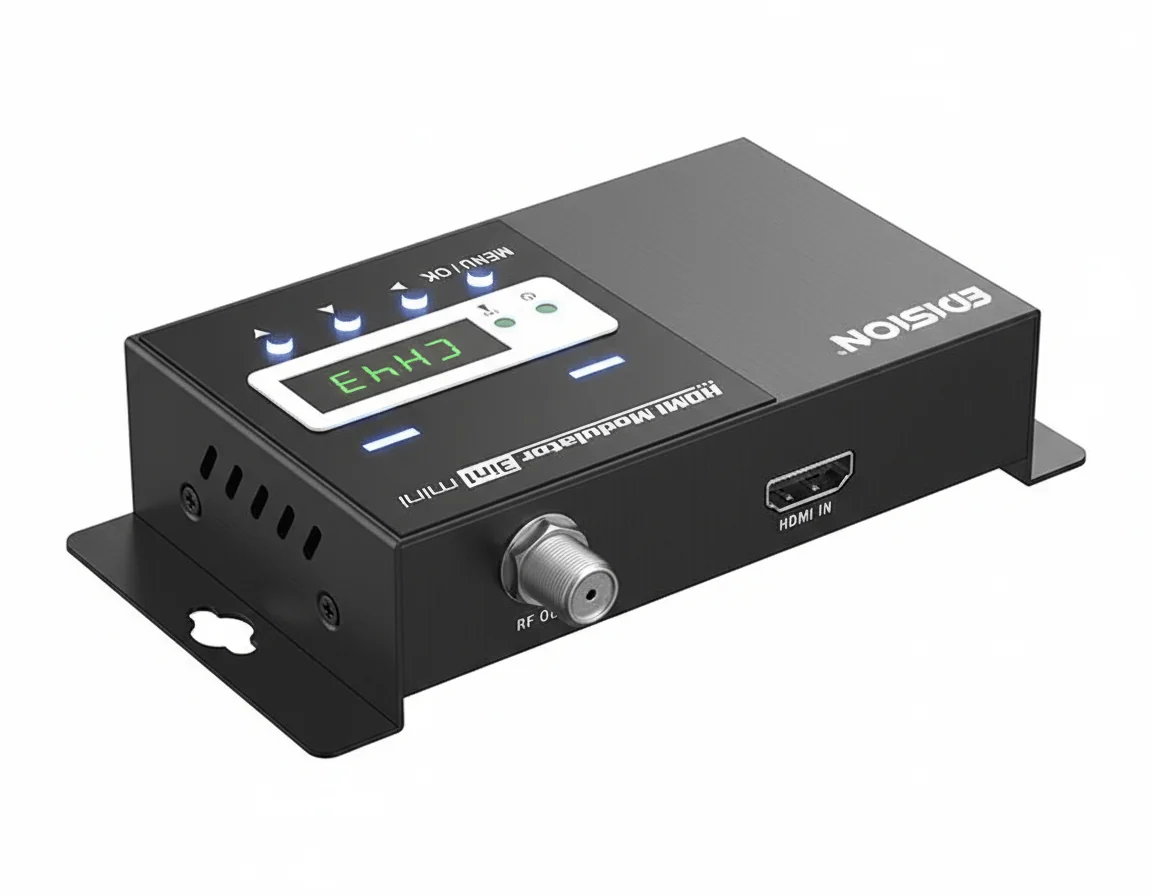
Most people assume HDMI is the “best” way to move video around a building. It’s digital, uncompressed, and every TV has a port. So why do so many real installations quietly abandon HDMI once the screen count goes up?
The answer shows up fast in hotels, bars, apartment blocks, and older homes. Long HDMI runs get temperamental. Splitters multiply failure points. EDID issues pop up at the worst possible time. Meanwhile, there’s already a perfectly good coax network in the walls that’s been carrying RF signals reliably for decades. That mismatch—modern HDMI sources versus legacy but robust RF infrastructure—is where the HDMI modulator earns its keep.
This isn’t about consumer gadgets or “smart” features. It’s about distribution that scales without drama. The sections that follow dig into how HDMI modulators actually work, what the compression really costs you, why standards like DVB‑T or ATSC matter more than brand names, and where people usually get tripped up during setup. If you’re deciding between pulling new cables or reusing coax, this should help you make that call with eyes open.
1. The Real-World Problem HDMI Modulators Actually Solve
The job usually starts with a complaint, not a spec sheet. A hotel can’t get the same video on 40 TVs without running HDMI cables everywhere. A sports bar wants Sky Q on every screen, but the walls are solid concrete. Or a homeowner realizes too late that their coax network is still perfectly fine—yet every new source is HDMI-only.
I’ve seen people try splitters, extenders, even sketchy HDMI-over-Ethernet boxes. They work… until they don’t. Cable length becomes touchy beyond 20–30 meters, EDID handshakes get flaky, and suddenly one TV shows snow while another drops audio. That’s usually when an HDMI modulator enters the conversation.
An HDMI modulator converts a clean HDMI signal into an RF television channel that rides over standard coax. The TV doesn’t know—or care—that the source was HDMI. It just sees a digital channel during a scan and tunes it like any other broadcast. That’s the core value. No apps. No smart TVs. No IP networking headaches.
Here’s what matters: this isn’t a consumer gadget problem. Its distribution. RF distribution. And when done right, it’s boringly reliable. When done wrong, you’ll be rescanning TVs at midnight, wondering why channel 45 vanished again.
2. HDMI vs RF Distribution: What the Numbers Actually Say
Pure HDMI distribution looks great on paper. Zero compression. No latency. But once you get past 10–15 displays, the math turns ugly. Active splitters, powered extenders, CAT6 runs, control issues—it adds up fast.
RF distribution scales differently. One HDMI input becomes one RF channel. That channel can feed 5 TVs or 500, as long as signal levels are managed. Coax losses are predictable: roughly 5–7 dB per 30 meters at UHF, depending on cable quality. Amplifiers are cheap and well-understood.
Compression is the trade-off. A typical HDMI to RF modulator uses MPEG-2 or H.264 encoding. Bitrates usually land around 12–18 Mbps for 1080p, sometimes lower if the unit is cost-optimized. On fast sports content, you’ll notice it. On signage or news, usually not.
Cost-wise, a single-channel HDMI to DVB-T modulator often lands around 2.5–3× the price of a basic HDMI splitter setup. But once you cross roughly 8–10 displays, RF starts winning—both in hardware cost and long-term sanity.
| Distribution Method | Typical Distance | Scalability | Hidden Issues |
|---|---|---|---|
| HDMI Splitters | 15–30 m per run | Poor beyond 8 outputs | EDID conflicts, cable quality |
| IP Streaming | Network-limited | High (with IT support) | Latency, bandwidth contention |
| RF Modulation | 60–100 m per branch | Excellent | Compression artifacts |
3. Do You Need ATSC, DVB-T, or Something Else?
This is the question people skip—and regret later. The digital standard your HDMI modulator uses depends entirely on the TVs and the region. North America leans toward ATSC. Most of Europe uses DVB-T or DVB-T2. The wrong choice won’t “kind of” work. It simply won’t tune.
If you’re dealing with UK or EU televisions, an HDMI modulator DVB-T unit is the usual path. For US installations, ATSC is the safer bet. Mixing standards in the same building is where things get messy fast.
- ATSC: Common in the US, works with most OTA tuners
- DVB-T: Widely supported across Europe and parts of Asia
- DVB-T2: More efficient, but not all older TVs support it
4. The Most Common Mistake: Channel Collisions
I’ll be blunt: most HDMI modulator “failures” aren’t hardware problems. They’re planning mistakes.
Dropping a modulated channel onto an already busy coax network without checking frequencies is asking for trouble. Cable operators often occupy large chunks of spectrum, sometimes right where installers randomly pick channel 21 or 35. Result? Intermittent breakup, vanished channels, or a TV that tunes fine in one room and fails in another.
Loop-through ports don’t magically solve this. They only work when the existing RF environment is sparse. In dense cable systems, signals should be merged using proper combiners or splitters with known insertion loss. Yes, that adds 2–4 dB of loss. No, it’s not optional.
If you’re testing directly on a single TV, keep it isolated. Short coax. No splitters. Once it’s stable there, then integrate it into the wider network.
5. What’s Inside an HDMI Modulator (At a Practical Level)
Internally, these boxes are doing three jobs at once. First, they capture HDMI video, audio, and HDCP handling depending on the source. Second, they encode that signal into a compressed transport stream. Third, they upconvert it into an RF carrier at a selectable channel.
The encoding stage is where quality is won or lost. Cheaper units push aggressive compression to keep chip costs down. You’ll see mosquito noise around text or banding in gradients. Better units give you bitrate control or at least smarter presets.
Thermals matter more than people think. Continuous encoding generates heat. In rack-mounted installs, I’ve measured internal temps drifting into the low 60s °C after a few hours if airflow is poor. That’s not catastrophic, but it does shorten component life.
Build quality varies. Metal enclosures help with shielding and heat. Plastic cases save cost but can leak RF noise if grounding is sloppy.
6. Key Features That Actually Matter (And a Few That Don’t)
Spec lists can be long. Only a handful of items really affect day-to-day use.
- Channel range: User-selectable channels (often 2–99) give flexibility during installs
- Output level control: Being able to trim RF output by a few dB saves amplifier headaches
- Front-panel display: Sounds minor, but it makes field adjustments faster
- IR pass-through: An HDMI modulator with IR helps when the source device is locked in a rack
What I’m less impressed by: flashy upscaling claims or “broadcast-grade” labels without bitrate transparency. If the manufacturer won’t tell you encoding parameters, assume they’re fixed and conservative.
Some installers prefer familiar names like Triax, Technomate, or Edision. That’s fine. Others, including teams working with WellCircuts on distribution projects, care more about RF stability and predictable behavior than brand badges.
7. Typical Specifications—and What They Mean in Practice
Specs look clean. Reality isn’t. Here’s how common numbers translate once the box is bolted into a rack.
| Specification | Typical Range | What to Watch For |
|---|---|---|
| Video Input | 720p–1080p60 | 4K usually downscaled |
| RF Output Level | 70–90 dBµV | Too hot causes tuner overload |
| Encoding | MPEG-2 / H.264 | Bitrate often fixed |
High output isn’t always good. In small networks, 80+ dBµV straight into a TV can overload the tuner. Attenuators exist for a reason.
8. Where HDMI Modulators Are Used—and Where They’re a Bad Fit
Hotels, apartment blocks, gyms, schools—anywhere with an existing coax backbone is fair game. A single HDMI to DVB-T modulator can feed dozens of screens without touching IP infrastructure.
They also show up in retail signage and security monitoring, where latency of a few hundred milliseconds isn’t critical. Sports bars use them heavily, especially for Sky Q or similar boxes, as long as HDCP restrictions are handled properly.
Where they struggle: interactive content, 4K distribution, or environments where every screen needs a different source. In those cases, IP-based systems or direct HDMI still make more sense.
Bottom line: an HDMI modulator isn’t modern or flashy. It’s practical. And in RF distribution, boring usually means reliable.
9. Tech Know-How That Actually Matters in the Field
Most install problems don’t come from “bad modulators.” They come from misunderstood RF basics. I’ve lost count of how many times someone blamed the HDMI modulator when the real issue was a marginal coax run or an overcooked signal level.
Here’s the short version: an HDMI modulator (especially an HDMI to RF modulator using DVB-T/COFDM) is only as good as the RF environment you drop it into. Output levels around 70–85 dBµV are common. Push that straight into a small coax network with no attenuation, and you’ll overload the TV tuners. Too low, and noise creeps in. There’s a narrow “boring but stable” window, usually somewhere around 60–70 dBµV at the TV input.
Bandwidth matters too. A single DVB-T channel typically eats 6–8 MHz. Stack four modulators without planning, and you’ve chewed up a big chunk of UHF. In older buildings, I’ve seen LTE interference around channels 48–60 cause random pixelation that looks like a modulator fault. It isn’t.
Compression settings are another quiet troublemaker. Many installers max out the bitrate because “higher is better.” Not always. For static content like menus or CCTV, 8–12 Mbps is usually fine. For sports or fast motion, 14–18 Mbps is safer, but only if your modulator and TVs handle it cleanly. I prefer stable over flashy. Always.
10. Questions I Get Asked (and Straight Answers)
Some questions come up every single time. Here are the ones worth addressing without marketing fluff.
- Does an HDMI modulator add delay?
Yes. Typically 80–200 ms depending on encoding settings. Fine for TV viewing. Annoying for gaming. - Will this work with Sky Q?
Usually, yes. An HDMI modulator Sky Q setup works as long as HDCP is handled correctly and you’re not trying to loop protected content through unsupported splitters. - Can one modulator feed 20–30 TVs?
RF-wise, yes. Quality-wise, it depends on your coax, splitters, and signal balance. The modulator isn’t the limiting factor most of the time. - Do TVs need to be the same brand?
No, but mixed tuner sensitivity can be a headache. Some cheap panels struggle below ~58 dBµV.
The question I wish people asked more often: “What happens when this breaks at 9 p.m.?” That’s where simple, standards-based RF wins over clever HDMI extender chains.
11. Analog HDMI Modulators: Still Alive, Still Misunderstood
Let’s get this out of the way: analog modulators aren’t “dead.” They’re just niche. Very niche.
An analog HDMI-to-RF unit converts HDMI to PAL or NTSC and dumps it on VHF/UHF. Picture quality is soft, usually limited to SD, and text looks rough. But the upside? Compatibility. Ancient TVs. Old CCTV monitors. Weird legacy systems that refuse to die.
I’ve seen analog units used in factories where displays are 20 years old, and nobody wants to replace them. In those cases, a digital HDMI modulator DVB-T would be pointless. The screens can’t decode it anyway.
The trade-offs are obvious: more noise sensitivity, fewer channels, and zero future-proofing. If you’re distributing HDMI to modern TVs, digital wins every time. If you’re keeping an old system alive for a few more years, analog is cheap, ugly, and sometimes exactly right.
12. Model Selection: Single DVB-T, COFDM, and What You Really Need
This is where people overbuy. Or worse, underbuy.
A single-channel DVB-T modulator does one thing: it takes one HDMI input and turns it into one RF channel. For most homes, a small bar or a basic Sky distribution is enough. Multi-channel units make sense when rack space is tight or when you’re managing many sources.
| Modulator Type | Typical Use | Watch Outs |
|---|---|---|
| Single DVB-T | Homes, small venues | One source only, manual tuning |
| Multi-channel DVB-T | Hotels, campuses | Cost, heat, RF planning |
| COFDM (Advanced) | Long coax runs, noisy RF | Setup complexity |
Some installers default to “COFDM because it sounds pro.” That’s not wrong—but it’s not always needed. Short runs, clean coax, and modern TVs? Basic DVB-T is usually fine.
I’ve seen decent guidance from suppliers like WellCircuits that actually ask about TV count, cable length, and existing RF before suggesting a box. That’s the right conversation.
13. Accessories and Upgrades Nobody Thinks About Until It Hurts
The modulator is only half the system. Sometimes less.
Attenuators save more installs than any firmware update. Fixed 6–12 dB pads are cheap insurance against tuner overload. Same with decent splitters—don’t reuse the rusty ones pulled from a ceiling in 1998.
IR return is another trap. A lot of people want an HDMI modulator with IR so they can control the source remotely. It works, mostly. Until fluorescent lighting, plasma screens, or long cable runs start corrupting IR signals. RF-based remote extenders are more robust, but cost more.
Rack mounting, ventilation, and power conditioning matter too. Multi-channel units can run warm—40–55°C case temperature isn’t unusual. Stuff that in a sealed cupboard and expect early failure.
14. Documentation, Setup Notes, and Why Manuals Get Ignored
Here’s a dirty truth: most HDMI modulator manuals are written by engineers who assume you already know RF. They skip the “why” and jump straight to menus.
Take five minutes to document channel numbers, output levels, and LCN settings. Future-you will thank you. So will the poor tech who inherits the system.
During setup, I usually scan one TV directly at the modulator output first. No splitters. No amps. If it’s clean there, problems downstream are almost never the modulator.
Firmware notes matter as well. Some updates quietly change encoder behavior or default bitrates. Not always better. If it’s stable, I don’t rush updates unless there’s a known bug.
15. Additional Practical Notes Before You Commit
If you’re expecting zero-maintenance perfection, adjust expectations. HDMI modulators are stable, not magical.
Plan spare RF space. Leave at least one empty channel between strong signals if you can. TVs vary wildly in tuner selectivity. What works on one brand might marginally fail on another.
Check regional standards. In the UK and parts of Europe, DVB-T is the norm. Elsewhere, ATSC or ISDB may apply. Buying the wrong standard is an expensive mistake.
Final thought—boring systems last. A clean HDMI source, a correctly configured HDMI to RF digital modulator, sane RF levels, and decent documentation will outlive most “clever” AV-over-IP experiments. Start simple. Expand only when the problem actually demands it.
HDMI modulators solve a very specific problem: getting one clean HDMI source onto many displays without fighting cable limits, handshake issues, or fragile extenders. They do it by leaning on RF distribution, which is predictable, scalable, and frankly boring—in the best way. The trade-off is compression, some setup complexity, and the need to think in terms of channels and signal levels rather than plug-and-play cables.
The practical way forward is to define your constraints before picking hardware. Count the displays, measure coax lengths, confirm whether your TVs expect DVB‑T, ATSC, or another standard, and decide how much compression you can tolerate. Test with a real TV scan, not just a monitor on the bench. A properly chosen hdmi modulator won’t feel exciting once installed—and that’s usually the sign you picked the right approach.
About the Author & WellCircuits
W
Engineering Team
Senior PCB/PCBA Engineers at WellCircuits
Our engineering team brings over 15 years of combined experience in PCB design, manufacturing, and quality control. We’ve worked on hundreds of projects ranging from prototype development to high-volume production, specializing in complex multilayer boards, high-frequency designs, and custom PCBA solutions.
About WellCircuits
WellCircuts is a professional PCB and PCBA manufacturer with ISO9001:2015 certification and UL approval. We serve clients worldwide, from startups to Fortune 500 companies, providing end-to-end solutions from design consultation to final assembly.
Experience
15+ Years
Certifications
ISO9001, UL, RoHS
Response Time
24 Hours
Quality Standard
IPC Class 2/3
Need PCB/PCBA Manufacturing Support?
Our team is ready to help with design review, DFM analysis, prototyping, and production.Get in Touch