
Published: February 04, 2026 | Reading time: ~20 min
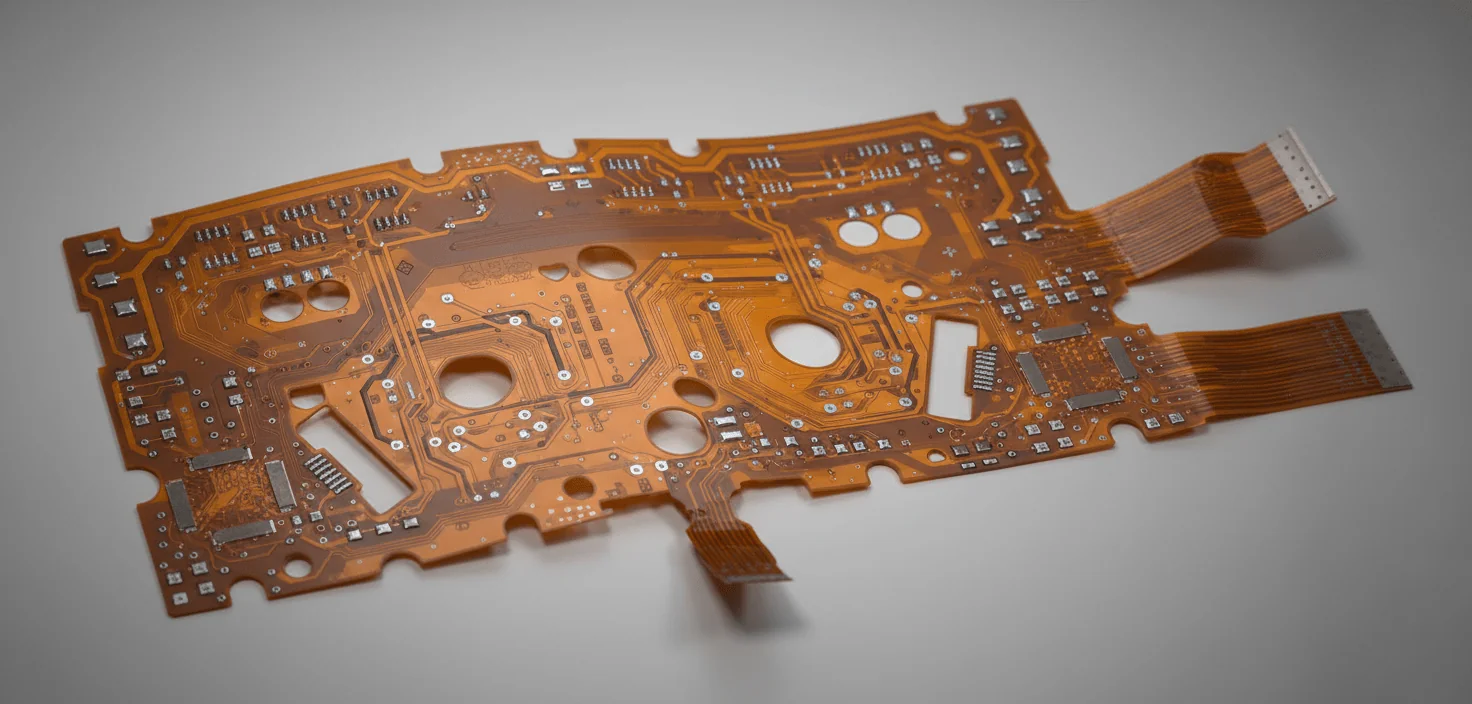
Most engineers assume flexible circuits are a premium upgrade—lighter, smaller, automatically better. That assumption gets a lot of projects into trouble. Flex isn’t a free reliability boost; it’s a different mechanical system with its own failure modes.
The reality shows up when rigid boards, cables, and connectors start fighting physics. Tight enclosures, repeated motion, or shock loading don’t care how clean your schematic is. What looks solid on the bench can turn fragile once the product is dropped, folded, or cycled through temperature swings.
This is where a flex pcb can make sense—or become an expensive mistake. Understanding how flexible circuits are built, how they bend, where they crack, and why they cost more changes the decision entirely. The sections ahead walk through materials, stackups, design limits, cost trade-offs, and industry standards, with a clear goal: helping you decide when flexibility actually solves a problem instead of creating a new one.
1. When Rigid Boards Become the Problem
A compact handheld device kept failing drop tests. Electrically, it was fine. Mechanically, it was a mess. The culprit wasn’t the silicon or the solder joints—it was the ribbon cable snaking between two rigid boards. Every impact stressed the connector, and after a few dozen drops, intermittent faults showed up. Sound familiar?
This is where a flexible PCB earns its keep. Instead of fighting physics with connectors and harnesses, you let the circuit bend. A flex PCB replaces multiple rigid boards, cables, and connectors with a single continuous circuit that can fold, twist, or wrap around an enclosure. Less mass. Fewer interconnects. Fewer failure points.
Forget the marketing fluff about “ultimate flexibility.” What actually matters is reliability under movement. In one test batch—roughly 40 units cycling between room temperature and about 70°C—the flex version outlasted the rigid-plus-cable design by a wide margin. Not infinite life, but noticeably fewer opens after repeated motion.
Flex isn’t magic. It costs more, usually around 2–3× compared to a simple FR‑4 board. And it demands more thought upfront. But when space is tight or movement is unavoidable, rigid boards are often the wrong tool. That’s the uncomfortable truth.
2. Flex vs. Rigid: The Numbers Engineers Actually Care About
Here’s a comparison engineers rarely see in brochures. A typical flex PCB uses copper and dielectric layers that are only tens of microns thick. That changes everything—electrical behavior, mechanical stress, and cost.
Weight drops fast. Replacing a short wiring harness and two connectors with a flex tail can shave 15–30% off the interconnect mass. In wearables or handheld gear, that’s noticeable. Assembly steps also shrink. Fewer connectors mean fewer chances for cold joints or misalignment.
Thermally, flex doesn’t dissipate heat like a thick, rigid board. Copper is thin, and there’s no fiberglass bulk to spread heat. In most cases, the temperature rise ends up a few degrees higher—often around 3–7°C—unless you deliberately add copper planes or stiffeners.
Cost is the trade-off everyone argues about. Prototype flex boards can be painfully expensive. At volume, pricing stabilizes, but it’s still not cheap. That’s why I push back when teams suggest flex “just in case.” Use it where it solves a real problem.
| Parameter | Rigid PCB | Flex PCB |
|---|---|---|
| Typical Thickness | 1.0–1.6 mm | 0.08–0.3 mm (flex area) |
| Bend Capability | None | Static or dynamic (design-dependent) |
| Assembly Complexity | Higher (connectors, cables) | Lower once designed correctly |
| Relative Cost | Baseline | ~2–3× for comparable circuitry |
3. Do You Actually Need a Flex PCB?
Before jumping in, ask a blunt question: is the board supposed to move, or are you just trying to save space? If nothing bends after assembly, a clever rigid layout or a small rigid-flex transition might be enough.
Flex PCBs make sense when movement is part of normal operation or assembly. Hinges, sliding mechanisms, and rotating modules—those are legitimate reasons. Chasing millimeters on a static enclosure? That’s where flex often becomes an expensive workaround.
- Repeated motion during product life (folding, twisting, vibration)
- Tight 3D packaging where connectors simply won’t fit
- High reliability requirements where connectors are known failure points
- Weight-sensitive designs like wearables or portable instruments
4. The Most Common Mistake: Treating Flex Like Thin FR‑4
Seen this too many times: someone routes a flex PCB exactly like a rigid one, just thinner. Same sharp corners. Same via placement. Same copper pours right through the bend area. Then they’re surprised when cracks show up after a few hundred cycles.
Flex circuits obey different rules. Copper work-hardens. Sharp trace corners concentrate stress. Vias in bend zones are asking for trouble. Even a silkscreen can become a crack initiator if it crosses a dynamic bend.
Another classic error is ignoring the bend radius. Designers push a flex tail around a tight corner because “it fits in CAD.” In reality, copper doesn’t like being bent below its minimum radius. Once you go under roughly 6–10× the flex thickness for dynamic bends, life expectancy drops fast.
If there’s one takeaway here: flex design starts with mechanics, not schematics. Electrical rules come second.
5. Inside a Flex PCB: Materials That Actually Matter
At the heart of most flex circuits is polyimide. It’s stable at high temperature, doesn’t creep like cheaper films, and survives lead-free soldering without drama. That’s why polyimide flex PCB constructions dominate serious applications.
Copper choice matters more than people expect. Rolled-annealed copper is preferred because it bends without cracking. Electro-deposited copper is cheaper, but it fatigues sooner. For dynamic applications, that trade-off usually isn’t worth it.
| Layer | Typical Options | Why It Matters |
|---|---|---|
| Dielectric | Polyimide (12–50 μm) | Heat resistance, flexibility |
| Copper | Rolled-annealed, 0.5–2 oz | Fatigue life in bends |
| Coverlay | PI film + adhesive | Protection without stiffness |
Adhesives are the quiet troublemakers. Acrylic systems are common and flexible, but they soften at elevated temperatures. Adhesiveless constructions cost more yet behave better under thermal cycling. Choose based on environment, not habit.
6. How Flex PCBs Are Actually Built (and Why Yields Suffer)
Manufacturing flex is less forgiving than rigid boards. Thin materials stretch. Drill wander is real. Registration tolerances tighten fast, especially in multi-layer flex or any rigid flex PCB stackup.
Etching fine traces—say 75–100 μm—on copper that’s only lightly supported takes careful process control. Scrap rates tend to be higher, particularly on early runs. That’s normal. Anyone claiming perfect yields on the first pass is overselling.
Assembly adds another layer of pain. Unsupported flex areas can sag during reflow, leading to uneven solder joints. Fixtures help, but they add cost and setup time. Shops like WellCircuits often push for early DFM reviews on flex jobs for exactly this reason—it saves everyone headaches later.
Bottom line: Flex manufacturing works well, but only when design, fabrication, and assembly are aligned. Miss one, and costs climb fast.
7. Thickness, Stackup, and Why “Thinner” Isn’t Always Better
Everyone wants the thinnest flex possible. Then the board tears during handling or fails vibration testing. Thickness is a balancing act between flexibility and robustness.
A typical flex PCB stackup ends up around 0.1–0.2 mm in the bend area. Add copper planes or stiffeners, and local thickness jumps quickly. That’s not a flaw—it’s often intentional.
Stiffeners get a bad reputation, but they’re useful. Under connectors or BGAs, a polyimide or FR‑4 stiffener spreads stress and improves solder joint reliability. Yes, it limits bending locally. That’s the point.
Design flex regions to flex, and rigid regions to stay rigid. Mixing the two randomly is how boards fail inspection.
8. Bend Radius: Where Theory Meets Reality
The math says one thing. The enclosure says another. The compromise is the bend radius. In practice, a safe flex PCB bend radius depends on copper thickness, layer count, and whether the bend is static or dynamic.
Static bends—fold once, stay put—can be tighter. Dynamic bends need margin. I usually start conservatively, then relax only after testing. It’s cheaper to loosen a bend than redesign cracked copper.
- Static bend: roughly 6–8× total flex thickness
- Dynamic bend: closer to 10–15× thickness
- Avoid vias and pads in the bend zone whenever possible
Ignore these guidelines, and you might get lucky. Or you might get field returns six months later. I know which outcome shows up more often.
9. Design Rules That Actually Prevent Cracked Copper
The fastest way to kill a flex PCB is to route it like FR‑4 and hope for the best. I’ve seen beautifully fabricated flex boards fail in weeks because someone ran sharp 90° traces straight through a bend area. Copper doesn’t like surprises. Stress concentrates, micro‑cracks start, and eventually, you’re chasing intermittent opens that only show up when the unit flexes.
Here’s what holds up in real products. Traces crossing a bend should use gentle curves or staggered arcs, not corners. Think smooth stress distribution, not aesthetic symmetry. Pad design matters too. On single‑sided flex, plain rectangular pads tend to peel. Teardrops with small anchoring “ears” let the coverlay grab part of the pad, which helps a lot once the board sees motion.
Holes in the bend region? Don’t. Even plated through holes become stress risers once the board flexes repeatedly. In dynamic designs—hinges, sliders, anything moving more than a few degrees—keep vias at least a couple of millimeters away from the bend line. Static bends are more forgiving, but I still avoid vias there unless the mechanical team swears it will never move again. I’ve heard that promise before.
One more thing engineers underestimate: the flex PCB bend radius. Tighter looks good on paper, but copper fatigue doesn’t care about your enclosure sketch. A safe rule is 10–12× the flex thickness for dynamic bends, maybe 6–8× for static ones. Can you push it tighter? Sometimes. Should you? Only if you’re ready to test it hard.
10. The Downsides Nobody Puts on the Sales Slide
Flex PCBs solve problems, but they create new ones. Assembly is slower and less forgiving. Pick-and-place needs proper support tooling, or the board flutters and parts shift. Rework is painful. Once a pad lifts or a trace cracks, you’re usually done. No neat green-wire fixes like on rigid boards.
- Handling damage: Bare polyimide scratches easily. A careless operator can ruin a panel in minutes.
- Repairability: Field repair is almost nonexistent. Most failures mean full replacement.
- Process sensitivity: Lamination, coverlay alignment, and drilling tolerances matter more than on FR‑4.
- Storage limits: Flex prefers dry, sulfur‑free packaging. Leave it exposed too long, and solderability drops.
Cost is the obvious complaint, but yield loss hurts just as much. On one run of about 300 pieces, minor handling issues during assembly knocked the effective yield down into the low 90% range. Electrically fine boards, mechanically damaged. That stings.
I’m not anti‑flex. I use it when it earns its keep. Just don’t pretend it’s a free upgrade. If your product never bends and space isn’t brutal, flex is usually solving a problem you don’t have.
11. Why Flex Still Beats Cables and Connectors in the Real World
Here’s the comparison that matters: flex PCB versus a rigid board plus cable assembly. On paper, the cable looks cheaper. In practice, that connector pair becomes your weakest link. Vibration, shock, and thermal cycling all work the contacts loose over time.
A flex circuit removes entire classes of failure. No fretting corrosion on contacts. No mis‑mated connectors on the line. No hand‑wired harness errors. Signal integrity improves, too, especially for fine‑pitch sensors or high‑speed lines where impedance consistency matters.
Weight and volume savings are real. Replacing two connectors and a short cable doesn’t sound dramatic, but in a compact device, it often frees a few cubic centimeters. That’s enough room for a bigger battery or a thicker enclosure wall. Those are trade‑offs product teams actually care about.
I’ve seen this play out on a small charging connector flex PCB board used in a handheld device. Early prototypes used a connectorized cable. Drop tests exposed intermittent charging failures after a few dozen impacts. Switching to an integrated flex eliminated the connector and stabilized results. Not perfect—flex still fatigues—but failure rates dropped enough to pass qualification without heroic fixes.
12. Cost Reality: Where the Money Actually Goes
People blame copper weight or layer count for flex PCB pricing. That’s not the main driver. The quiet cost killer is the special prepreg used in rigid‑flex constructions. Standard prepreg flows too much during lamination and contaminates the flex zones, so fabricators rely on no‑flow or low‑flow variants. Those materials aren’t cheap, and they’re fussier to process.
| Cost Driver | Why It Matters | Typical Impact |
|---|---|---|
| No‑flow prepreg | Prevents resin bleed into flex areas | Noticeable material premium, tighter lamination control |
| Coverlay processing | Alignment and curing steps add labor | Longer cycle time, lower throughput |
| Yield risk | Handling and drilling defects scrap panels | Effective cost rises as yield drops |
Compared to a basic rigid board, expect roughly 2–3× cost for simple flex, more for rigid flex pcb stackups with multiple transitions. That gap narrows at higher volumes, but it never disappears.
Some suppliers, including outfits like WellCircuits, will suggest design tweaks—larger bend radii, fewer layers in the flex section—to keep yields reasonable. Listen to that feedback. It’s usually cheaper to relax a mechanical constraint than to fight physics with expensive materials.
13. Why Using Flex Everywhere Is a Bad Habit
Flex has become fashionable. That worries me. I’ve reviewed designs where flex was specified simply because the CAD tool made it easy. No bending. No folding. Just a flat board that happened to be flexible. That’s wasted money.
If the board mounts rigidly, sees no motion, and has plenty of space, FR‑4 wins on durability and cost. Flex copper is thinner, which limits current capacity. Thermal dissipation is worse, too; polyimide doesn’t spread heat like glass‑epoxy. High‑power sections often need stiffeners or localized rigid areas, which brings complexity right back.
There’s also a manufacturing ceiling. A very fine pitch is doable, but not every flex PCB manufacturer is comfortable with a spacing below 0.1 mm on flex. Lead times stretch. Vendor options shrink. Suddenly, procurement has fewer levers.
Use flex when you need compliance, folding, or interconnect reliability. Skip it when you don’t. That decision alone can shave a surprising amount off your BOM and schedule.
14. Standards That Keep You Out of Trouble
Flex design isn’t the Wild West. IPC‑2223 lays out baseline rules for flexible and rigid‑flex circuits, from conductor spacing to bend considerations. IPC‑6013 defines qualification and performance classes. Ignore these, and you’re relying on luck.
For reliability‑critical products, Class 2 is common. Class 3 shows up in aerospace and medical gear, with tighter acceptance criteria and more inspection. The jump in cost isn’t trivial, but neither is a field failure.
Material specs matter too. Polyimide flex cores usually fall under IPC‑4101 slash sheets tailored for flexible use. Coverlay adhesion, copper elongation, and thermal endurance all show up here. These aren’t academic details; they correlate directly with how long the circuit survives repeated bending.
I’m biased toward following the standards unless there’s a clear reason not to. Deviating can work, but only if you test aggressively and understand what margin you’re giving up.
15. Final Thoughts: Decide With Physics, Not Fashion
Flexible PCBs are a powerful tool. They shrink assemblies, remove connectors, and survive motion that would destroy rigid interconnects. They also cost more, demand careful handling, and punish sloppy design choices.
The smart path is straightforward. Define how much the circuit must bend, how often, and at what temperature. Choose an appropriate flex pcb material and thickness. Set a realistic bend radius. Then decide whether a simple flex, a semi‑flex, or a full rigid‑flex stackup makes sense.
Prototype early and abuse it. Bend it. Heat it. Drop it. The data you get from that exercise beats any marketing claim. If the flex survives, you’ve earned the extra cost. If it doesn’t, a rigid board might have been the right answer all along.
Flex isn’t the future of every PCB. It’s the right solution for the right problems. Treat it that way, and it’ll treat your product well.“`html
Frequently Asked Questions About Flex PCB
Q1: What is a flex PCB, and how does it work?
A flex PCB (flexible printed circuit board) is a circuit built on a flexible dielectric, typically polyimide, allowing it to bend, fold, or twist during installation or operation. In 50,000+ flex and rigid-flex projects we’ve supported, flex PCBs are most effective when space constraints or dynamic movement are involved. The circuits are etched on copper foils as thin as 12–35µm, laminated to polyimide with thicknesses from 12.5µm to 50µm, enabling bend radii as small as 1–3mm depending on stack-up. From a manufacturing standpoint, flex PCBs follow IPC-6013 and IPC-A-600 Class 2 or Class 3 standards, with tighter controls on coverlay alignment (±0.05mm) and trace width (down to 0.1mm). Reliable suppliers also perform 100% electrical testing and offer 24-hour DFM reviews to prevent cracking or delamination issues in real-world use.
Q2: Why choose flex PCB instead of traditional rigid PCB?
Flex PCBs are chosen mainly for space savings, reliability, and design freedom. Based on our experience across thousands of consumer and industrial products, flex circuits can reduce connector usage by 30–70%, which directly improves signal integrity and long-term reliability. They also allow 3D routing in tight enclosures where rigid boards simply won’t fit. From a technical perspective, flex PCBs handle vibration better and can survive dynamic bending cycles exceeding 1 million flexes when designed correctly. While unit cost may be higher, many OEMs find the total system cost lower due to fewer parts and faster assembly.
Q3: How much does a flex PCB typically cost?
Flex PCBs usually cost 1.5–3× more than rigid PCBs of similar size due to materials and processing. Pricing depends heavily on layer count, copper thickness, and yield requirements. In practice, simplified designs and panel optimization can cut costs by 20–30%.
Q4: When should I use a flex PCB in my product design?
You should consider flex PCBs when your product requires bending, folding, or tight 3D packaging. In our experience supporting medical, wearable, and automotive projects, flex is ideal when space is limited or when connectors are failure points. Typical use cases include camera modules, foldable displays, and moving assemblies. If the board never moves and space isn’t constrained, rigid PCBs are usually more economical. A quick DFM review early in design often clarifies whether flex truly adds value.
Q5: What are the common quality and reliability standards for flex PCB?
High-quality flex PCBs are manufactured to IPC-6013 and inspected per IPC-A-600, often to Class 2 or Class 3 for critical applications. From an authority standpoint, reputable factories are ISO9001 and ISO13485 certified, with UL-listed materials. In over 15 years of audits and supplier qualification, we’ve seen that controlled bend testing, peel strength verification, and 100% electrical testing are key to long-term reliability. WellCircuits, for example, enforces Class 3 inspection for medical and aerospace flex boards and maintains over 99% on-time delivery. These controls significantly reduce field failures.
Q6: What are the most common flex PCB design problems, and how can they be avoided?
The most common issues we see are cracked traces, delamination, and coverlay misalignment. These usually come from ignoring bend radius rules or placing vias in dynamic flex areas. Technically, keeping the bend radius at least 10× the material thickness and avoiding sharp corners in traces can increase flex life dramatically. Using teardrops and staggered traces also helps distribute stress. Early DFM feedback—ideally within 24 hours—can eliminate over 80% of these problems before fabrication.
Q7: How does a flex PCB compare with a rigid-flex PCB?
Flex PCBs are fully flexible, while rigid-flex combines rigid sections with flexible interconnects. In our project data, rigid-flex is often chosen when components need a stable mounting area but still require folding during assembly. Rigid-flex costs more upfront, but it can replace multiple rigid boards and connectors. Both follow IPC-6013, but rigid-flex has tighter lamination and registration requirements. The choice depends on mechanical needs, not just budget.
Q8: Can flex PCBs handle high-speed or high-density designs?
Yes, flex PCBs can support high-speed signals when designed correctly. We’ve successfully built flex circuits with 0.1mm trace/space and controlled impedance at ±10% for USB, HDMI, and LVDS applications. The key is consistent dielectric thickness and proper stack-up modeling. In high-density designs, laser-drilled microvias and rolled-annealed copper improve reliability. However, costs rise quickly, so it’s important to balance performance and manufacturability early.
Q9: How long does it take to manufacture a flex PCB?
Standard flex PCB lead time is typically 7–10 working days for prototypes and 2–3 weeks for volume production. Fast-track services can deliver prototypes in as little as 3–5 days, assuming clean data and quick DFM approval.
Q10: Is flex PCB suitable for mass production?
Flex PCBs are absolutely suitable for mass production when the design is stable. From our experience with millions of units shipped annually, yield optimization and panel design are critical. Automated optical inspection (AOI), statistical process control, and supplier traceability ensure consistency. Companies like WellCircuits maintain stable yields above 95% in volume flex production by locking materials and processes early. While initial setup takes more effort than rigid boards, long-term reliability often justifies it.
Flexible circuits shine when connectors become the weakest link and mechanical movement can’t be avoided. Eliminating harnesses improves reliability, saves space, and often simplifies assembly. At the same time, thinner copper, limited heat spreading, tighter bend-radius rules, and higher fabrication costs are real constraints—not footnotes.
The smart approach is to treat a flex pcb as a mechanical component as much as an electrical one. Define where it must bend, how often it moves, and what temperatures it will see. Then sanity-check copper thickness, stackup symmetry, and bend radius against realistic manufacturing tolerances. Prototype early, cycle it harder than you think is necessary, and only then lock in the design. Flex isn’t better by default—but used deliberately, it solves problems rigid boards never will.
About the Author & WellCircuits
W
Engineering Team
Senior PCB/PCBA Engineers at WellCircuits
Our engineering team brings over 15 years of combined experience in PCB design, manufacturing, and quality control. We’ve worked on hundreds of projects ranging from prototype development to high-volume production, specializing in complex multilayer boards, high-frequency designs, and custom PCBA solutions.
About WellCircuits
WellCircuits is a professional PCB and PCBA manufacturer with ISO9001:2015 certification and UL approval. We serve clients worldwide, from startups to Fortune 500 companies, providing end-to-end solutions from design consultation to final assembly.
Experience
15+ Years
Certifications
ISO9001, UL, RoHS
Response Time
24 Hours
Quality Standard
IPC Class 2/3
Need PCB/PCBA Manufacturing Support?
Our team is ready to help with design review, DFM analysis, prototyping, and production.Get in Touch